Step one
Count the pitch
Use free rostered Quick Count on iPhone. Tap to count, undo a miscount, correct the total, or resume an interrupted outing. Keep your eyes on the field.
iPhone · internal TestFlight testing
A complete free pitch counter for adult coaches and parents. Count, correct, resume, and keep the record. Plus adds the rules and context that help you understand what those pitches mean for the next game.
How it works
Start with the free counter. Add Plus when you want league-rule estimates, advanced tracking, and more context for the recorded work.
Step one
Use free rostered Quick Count on iPhone. Tap to count, undo a miscount, correct the total, or resume an interrupted outing. Keep your eyes on the field.
Step two
Save completed counts to your pitcher's history. Your roster, raw records, and account export remain yours whether or not you subscribe.
Step three
Apply your selected rules to estimate the working limit, required rest, and next eligibility. Rule-backed outings save their rule context. Recorded workload adds context without making a physical-readiness assessment.
One optional subscription. The same Plus intelligence for coaches and parents, within the tools each uses.
A complete rostered counter on iPhone. No counting cap and no trial clock.
Free records the count. Choose Plus to see rule estimates and recorded workload.
Rules and recorded context for your next decision.
Six-month and annual plans. The app shows available offers, localized prices, and any trial eligibility before purchase.
If Plus ends, your roster, raw counts, history, and account export remain available. An in-progress rule-backed outing can finish with its saved rules. New Plus or Watch sessions require active Plus. Billing and access help.
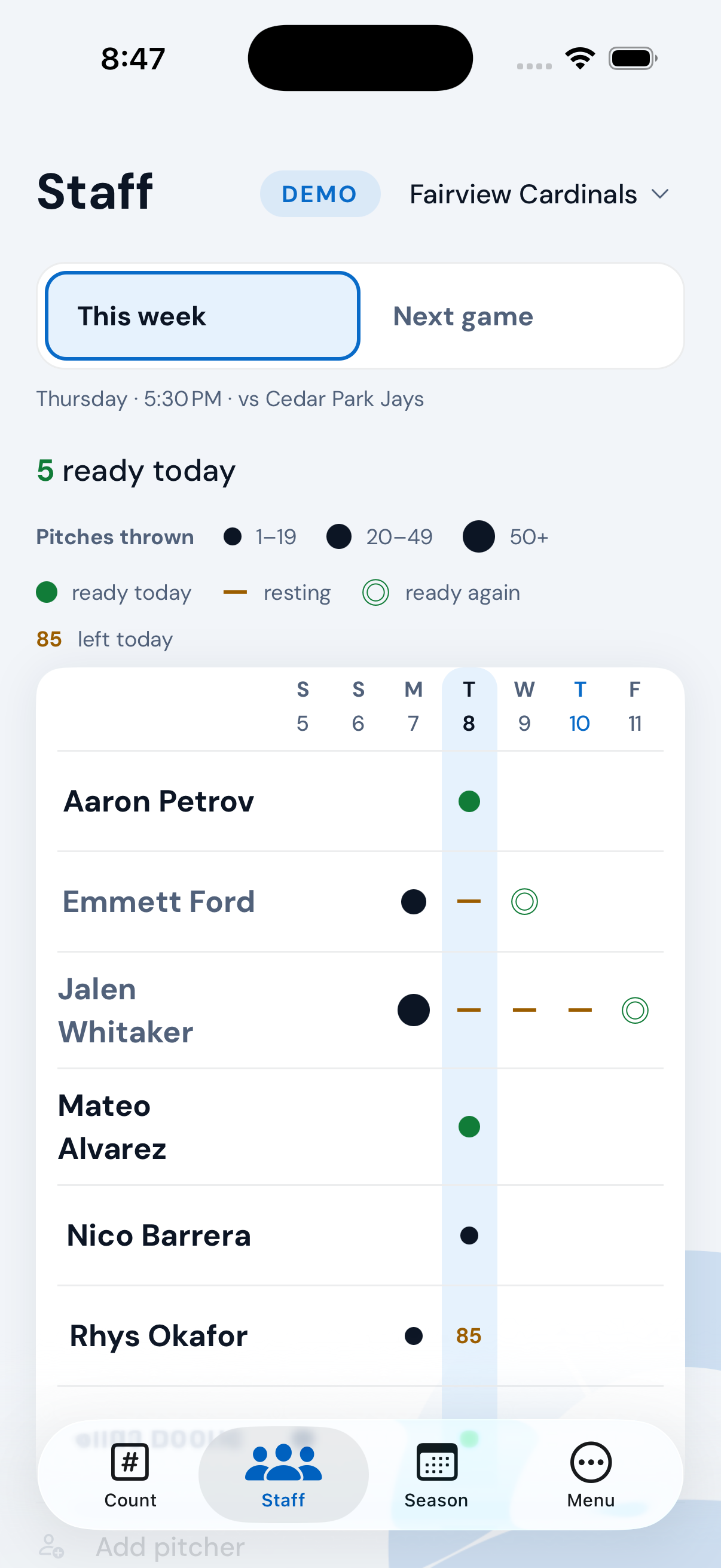
Mound Ready Plus · coach view
Recorded pitches, required rest, and the next game share one view. Review each pitcher's availability under the selected league rules, then open their record for the details.
The screen's availability labels describe rule eligibility from recorded activity. They do not assess a pitcher's physical readiness.
What's in it
Quick Count is free on iPhone. Plus adds Game Count, Pitch Mix, and Quick Track. Quick Track requires an account; it is separate from the read-only demo available before sign-up.
The app includes a read-only demo with an example roster, so you can see how counting and eligibility behave before you make an account.
With Plus, review staff availability under the selected league rules before writing the lineup. Rule eligibility is an estimate from recorded context, not a statement about physical readiness.
Counts are saved on the phone first, with sync when connectivity returns. An interrupted count can be resumed. Check sync status before changing devices. Sync help explains how to keep pending records.
Plus includes the Apple Watch app and complication. Start a session on iPhone, then count from your paired Watch. The iPhone Live Activity is also available with free rostered Quick Count.
Export your account records to a JSON archive, and use the app's outing export tools to share recorded work. Account deletion removes active records permanently; it does not cancel an Apple subscription.
Who it's for
Keep the whole roster counting for free. Plus adds staff availability, bullpen intelligence, and schedule and rotation planning for your next game. You choose the pitcher; the app supplies recorded context and rule estimates.
Follow your pitcher across teams and seasons. Count for free; add Plus for each program's rules and recorded workload across programs in your account. Keep school, travel, and rec records together for the pitcher you follow.
The rules engine
Plus includes 55 built-in presets: six system presets and 49 state high-school associations. Each names its source document. Plus also lets you build a custom chart for a house league, travel ball, or a tournament.
Choose a chart and change the example count to see its rest tiers. This website illustrates one displayed band at a time; the app also considers recorded history and the selected rule context.
Regular season · ages 11–12
pitches today
Short leash
At or above the warning threshold for this chart.
Static example shown. Interactive charts need JavaScript and rule data.
Little League · verified
An illustrative single-chart calculation using data extracted from app presets. It assumes an outing today in the displayed age or grade band, with no prior throwing history. It does not evaluate consecutive days, rolling totals, appearance restrictions, or automatic seasonal chart changes. The app evaluates additional context. This example cannot establish eligibility; confirm current rules with your league.
New York — NYSPHSAA
New York doesn't publish a pitch-count chart. It publishes three — March, April, and May–June each get their own — and which one governs depends on the month you're in. The engine moves with the season.
Delaware — DIAA
Not on a date, on a contest count. Delaware also carries a doubleheader rule that turns on per-inning pitch counts, which the app doesn't track — so it says so on screen rather than quietly skipping it.
Why 49? Wyoming's association doesn't sanction high-school baseball, so there's no published rule to ship. When there's no rule, we don't invent one.
Every preset names its source document and ships marked verified or provisional, so you can see which kind you're looking at. Rule-backed outings snapshot their rule context. Free count-only records have no rule snapshot or derived verdict.
The honesty rule
The record provides context. The coach or parent makes the decision.
Privacy
No advertising, no behavioral profiling, no analytics built to follow you. Your data is never sold or shared with advertisers, leagues, or scouting services. Service providers process account sync, account emails, diagnostics, and subscription status to operate the app. The privacy policy explains what each receives.
Accounts are for adults — coaches and parents. Youth players do not sign in or use the app directly. Adults maintain private pitcher records. There are no leaderboards and no public profiles.
Deleting your account removes it and its records immediately, and can't be undone — no soft delete, no recovery window. Limited traces can persist in backups and provider logs until they expire on their own; the privacy policy explains retention. Cancel Plus separately in Apple's subscription settings.
Mound Ready is in internal TestFlight testing. Email to ask about future beta access; sending an email does not provide an immediate invitation. There's a read-only demo inside the app too, so you can look around before you make an account.